Export Instagram Reels Data to CSV for Client Reports
Step-by-step guide to export Instagram Reels data to CSV for client reports—columns, naming, tool workflows, agency templates, and privacy-safe habits.

Client decks do not need another screenshot of a scrolling Reels grid. They need a dated spreadsheet—ranked clips, view counts, post dates, and (when you revisit) what changed since last week. That is why teams search for ways to export Instagram Reels data to CSV: a portable file you can filter in Google Sheets, paste into Looker Studio, or attach to a Monday update without re-opening twenty browser tabs.
Instagram Insights covers your account well, but it does not ship a competitor Reels export. Native Competitive Insights compares a handful of account-level metrics—not a full ranked list of rival short-form videos. Below: what to export, which tools output CSV, how agencies structure client folders, and how to pair exports with benchmarking so the numbers tell a story.
Why CSV beats screenshots for Reels reporting
Screenshots are fine for a single viral clip. They fail when you report weekly on five rivals, fifteen Reels each, and need to answer: "Which format gained the most views since our last review?"
| Deliverable | Screenshot | CSV export |
|---|---|---|
| Sortable rank table | Manual retyping | One click sort in Sheets |
| Week-over-week delta | Guesswork | Join files by Reel URL + date |
| Client audit trail | Scattered PNGs | clientA_2026-06-05.csv in Drive |
| Creative brief handoff | Hard to filter | Filter by views, date, engagement |
| Multi-account review | Tab overload | One file per handle or merged sheet |
Agencies running a lightweight stack still beat enterprise suites when the ritual is consistent. For role-based workflows (who exports, who presents, who briefs creative), see Instagram Reels analytics for agencies—this article focuses on the export mechanics underneath that process.
What you can (and cannot) put in a Reels CSV
Exports should reflect public metrics visible on the Reels tab when you are logged into Instagram in the browser. You are not bypassing privacy controls or pulling private account data.
Typical columns worth including
| Column | Purpose |
|---|---|
account_handle | Which profile the row belongs to |
reel_url or shortcode | Stable key for week-over-week joins |
post_date | Cadence and recency filters |
views | Primary rank metric |
likes | Quality signal when exposed |
comments | Conversation depth |
engagement_rate | (likes + comments) / views when calculated |
caption_snippet | Hook / topic tagging for creative |
export_date | Required—views drift hourly on viral clips |
views_previous | Optional if your tool stores last run |
view_growth or growth_rate | Optional velocity column |
Usually not in a public Reels CSV
- Saves, shares, reach breakdown (owned Insights only)
- Audience demographics per Reel
- Private or follower-only Reels metrics
- Guaranteed "algorithm score"
Note
Always record export_date in the filename and inside the sheet. A Reel with 80k views on Monday can pass 200k by Friday—without a date stamp, client conversations get messy fast.
Tools that export Instagram Reels data to CSV
No single Meta button exports a competitor's full Reels grid. In practice you combine browser extensions, occasional web sorters, and Insights for owned data.
| Tool | CSV for competitor Reels | Typical free limits | Best for |
|---|---|---|---|
| Instagram Insights | Your Reels only; manual copy | No native competitor CSV | Owned-account truth layer |
| IShort | Yes (tiered) | Export caps on free | Single-profile sort + export |
| Sort Feed | Yes (paid tiers) | Usage-based | Formula ranking + spreadsheet users |
| EagleReels | Yes (CSV + HTML report) | Account/Reels caps on free | Multi-account competitor panels |
| SuperStats | Reports / exports | Varies | Deep post-level scans |
| Later / Iconosquare | Client PDFs (cloud) | Paid competitive modules | Full social suites |
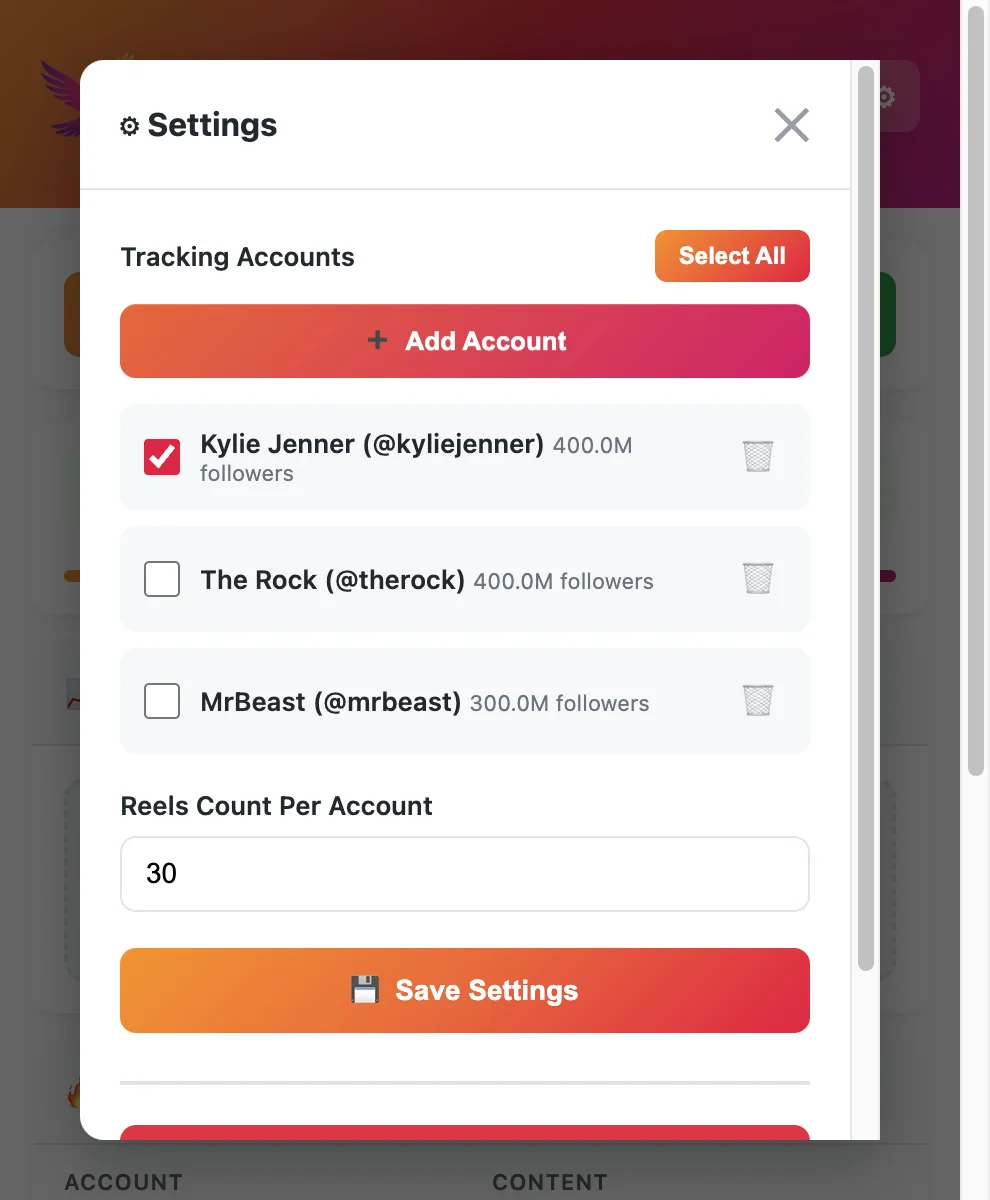
For a wider comparison of privacy models, competitor depth, and free-tier honesty, start with free Instagram Reels tracker tools—then pick the exporter that matches how many accounts you touch each week. Account-wide reporting beyond Reels still maps to free Instagram analytics options; this guide stays export-first.
How to export Instagram Reels data to CSV (step-by-step)
These steps map to most Chrome extensions that operate on the public Reels tab. Adjust menu labels to your tool.
Step 1: Define the export scope
Before opening Instagram, write down:
- Accounts — Client handle + 3–8 benchmark rivals (same list each week).
- Row count — Top 10, top 20, or all Reels loaded in the grid.
- Metrics — Minimum: views + post date; add engagement if available.
- Review date — The date you will paste into the filename.
Locking scope prevents "export everything" files that clients cannot read.
Step 2: Log into Instagram in Chrome
Extensions read your logged-in session to load public Reels data. Use a stable browser profile for agency work so sessions do not drop mid-export.
Step 3: Open each profile's Reels tab
Navigate to instagram.com/{username} → Reels. Let the grid finish loading before triggering the extension—partial loads produce incomplete CSV rows.
Step 4: Sort before you export
Exporting an unsorted grid wastes the client's attention. Sort by views descending for all-time leaders, or by growth since last check when your tool supports velocity. Sorting workflow detail lives in our sort Instagram Reels by views guide.
Step 5: Run the export action
In EagleReels, IShort, Sort Feed, or similar: open the panel on the Reels view → choose Export CSV (or Download report). Confirm row count matches what you see in the UI.
Step 6: Name and store the file
Use a consistent pattern:
{clientSlug}_{handle}_reels_{YYYY-MM-DD}.csv
Examples:
acme_beauty_rivalA_reels_2026-06-05.csvacme_beauty_own_reels_2026-06-05.csv(from Insights copy or your profile export)
Never overwrite last week's file—append dated files so you can compute deltas in Step 8.
Step 7: Normalize columns in Google Sheets
Open the CSV in a master workbook:
- Import → Replace current sheet or append to a
raw_exportstab. - Add a
week_idcolumn (2026-W23) for pivot tables. - Freeze header row; apply number formatting to views (no accidental text sort).
- If captions include commas, ensure UTF-8 import so emojis and hashtags stay intact.
Step 8: Join this week to last week (optional but powerful)
Use reel_url or shortcode as the key:
views_delta = views_today - views_last_weekgrowth_pct = views_delta / views_last_week(guard divide-by-zero on brand-new Reels)
Velocity columns turn a static rank into "what broke out this week"—the same signal you would stress in a benchmark Reels against competitors scorecard.
Step 9: Build the client-facing tab
Most clients do not want 200 raw rows. Create a summary tab:
| Metric | This week | Last week | Change |
|---|---|---|---|
| Median views (last 5 Reels) | |||
| Top Reel views (14d) | |||
| Fastest-growing Reel | link | % | |
| Rival with highest median | handle |
Attach the raw CSV in an appendix folder if they ask for audit detail.
Step 10: Deliver and archive
Send the summary slide or PDF plus a link to the dated CSV folder. Log one action item from the data ("Test 40s demo hook like Rival B's top 14d Reel") so reporting connects to production—hook and retention ideas live in how to increase Reels views, aligned with your wider Instagram growth strategy.
Agency folder structure (copy this)
/clients/{clientSlug}/reels-exports/
  /2026-06-05/
    own_reels_2026-06-05.csv
    rivalA_reels_2026-06-05.csv
    rivalB_reels_2026-06-05.csv
    summary_2026-06-05.pdf   (optional)
  /2026-05-29/
    ...
Pair exports with a living scorecard from the benchmarking guide. CSV is the evidence layer; the scorecard is the decision layer.
Tip
Run exports the same weekday and time for every client. View counts on viral Reels move hourly—consistent timing makes week-over-week CSV joins trustworthy.
CSV templates for common report types
Template A: Weekly competitor rank
| account | reel_url | post_date | views | likes | comments | export_date |
|---|---|---|---|---|---|---|
Template B: Owned Reels (from Insights + manual row)
| reel_title | post_date | plays | reach | saves | shares | notes |
|---|
Insights does not export competitor data—copy owned rows into the same workbook so client tabs compare your median to their median using the same review date.
Template C: Breakout watchlist
| reel_url | account | views_start | views_end | 7d_growth_pct | hook_tag |
|---|
Populate views_start from last week's CSV and views_end from this week's export. Flag rows where growth exceeds your team threshold (often 25–40% in seven days).
Privacy, compliance, and client expectations
- Public data only — Do not imply you have private metrics Instagram does not show.
- Local vs. cloud — Extensions like EagleReels emphasize local-first storage; cloud suites store data on vendor servers. Disclose where files live in your SOW.
- Not affiliated with Meta — EagleReels and similar tools are third-party; verify terms before automating exports at scale.
- Retention — Agree how long you keep rival CSVs; some clients prefer deletion after contract end.
Warning
Avoid sending clients a CSV with mislabeled dates or mixed time zones. If you export at 9am ET one week and 6pm PT the next, deltas on fast-moving Reels will look wrong even when the tool is accurate.
Troubleshooting export issues
| Problem | Likely cause | Fix |
|---|---|---|
| Fewer rows than visible Reels | Grid not fully scrolled / loaded | Scroll to load more, re-export |
| Duplicate URLs | Re-exported same day without dedupe | Deduplicate on reel_url + export_date |
| Views = 0 or blank | UI still loading | Refresh Reels tab, wait, retry |
| CSV garbled characters | Wrong encoding | Import as UTF-8 in Sheets |
| Client says numbers "do not match" | Different check time vs. your export | Show export_date; re-export at agreed time |
| Hit free tier cap | Account/Reels limits | Upgrade tier or split cohort across weeks |
Pair exports with benchmarking and trackers
Exports are not strategy by themselves. A minimal stack:
- Track rivals with a free Reels tracker or dedicated competitor panel.
- Benchmark medians and cohort arrows weekly via benchmark Reels against competitors.
- Export ranked tables to CSV after each sort pass (this guide).
- Brief creative from tagged patterns in the spreadsheet—not from one viral screenshot.
When you need velocity columns without building formulas yourself, use a tool that stores update history between visits, then export the enriched table.
FAQ
Frequently Asked Questions
Where to start
Export instagram reels data to csv when you need audit-friendly, sortable evidence—not another gallery screenshot. Define scope, sort before export, name files by client and date, join weeks for velocity, and summarize medians clients actually care about.
Insights stays the source of truth for your distribution metrics; extensions fill the competitor gap. Pair every export habit with benchmarking, sort by views, and free Reels tracker tools so data changes what you publish next week.
EagleReels on the Chrome Web Store — free install.
Last updated: June 5, 2026. EagleReels is not affiliated with Instagram or Meta. Export limits on free tiers may change—verify on the product site before signing client SLAs.
Related articles:
Ready to track your Instagram Reels performance?
Download EagleReels Chrome extension and start analyzing your Reels today. It's free!
Download EagleReelsRelated Articles

Instagram Reels Analytics for Agencies: Lightweight Competitor Workflow
Instagram Reels analytics for agencies—a lightweight competitor workflow with CSV exports, client benchmarks, free tools, and no heavy SaaS stack.

Data-Driven Instagram Reels Content Strategy (Competitor Data)
Build a data-driven Instagram Reels content strategy using competitor data—tracking workflows, growth signals, test calendars, and tools that beat guesswork.

Best Chrome Extensions for Instagram Reels Analytics in 2026
Compare the best Chrome extensions for Instagram Reels analytics in 2026—sorting, growth rate, exports, privacy, and which extension fits creators vs. agencies.